How to Sign Up Online
Sign Up for a Membership Note: You can not sign up on a mobile phone. SEE
Note: Student is another name for Member in our system.

Sign up
Click on SIGN UP Above.
.JPG/:/cr=t:0%25,l:0%25,w:100%25,h:100%25/rs=w:360,h:270,cg:true)
Select Membership Type
Choose from one of our memberships, Regular, First Responder, Military/Veteran. Please Note it could take up to 3 hours for your payment to process and allow door access.

Confirm Purchase
This is the amount for membership. If you purchased a Family Membership it will be the total for all members.

Login
Click on Login to establish a user name and password and your contact information. IMPORTANT: PLEASE WRITE DOWN YOUR USER NAME AND PASSWORD

Provide Member Information
Enter your contact information and click on Register

Provide Payment Information
Enter the cc or debit card that you will use to purchase the membership. MAKE SURE MEMBERSHIP BILLING ADDRESS MATCHES ADDRESS ASSOCIATED WITH CREDIT /DEBIT CARD. If not uncheck the box and provide the correct billing information.

Purchase complete
Purchase complete, Now Login

Read Terms
If you agree to terms check the box and click on I ACCEPT

Fill out Waiver & Health Information
Answer the question and read each section CHECK THE BOX next to each section.

Signature
Print your name and sign to complete. Must be 18 years old or parent/guardian of 16-17 yr old to sign.

Click on Profile
Enter the cc or debit card that you will use to purchase the membership. MAKE SURE MEMBERSHIP BILLING ADDRESS MATCHES ADDRESS ASSOCIATED WITH CREDIT /DEBIT CARD

Upload a Profile Picture
Please upload a picture for our records
Make Changes to your Account
Update your Payment information change password.
.png/:/rs=w:360,h:270,cg:true,m/cr=w:360,h:270)
Track your Progress & more. Set up door access below.
mobile application direct link
Please click on the link below to download the mobile app. see directions below:
Apple Link: https://apps.apple.com/us/app/rhinofit-hub/id6739364002
Google Play/Android: https://play.google.com/store/apps/details?id=www.rhinofit.ca.rhinofit_hub

Set Up DOOr Access
RhinoFit Mobile App is how you access fitness center with door scanner.
You must Start a membership and SIGN UP first: When signed up online, by email or at the fitness center you should have received a Welcome email to log in to your membership account. (check your Spam/junk file). To have mobile access you must provide an email address and have smartphone for each member. If you forgot your login please go to -Log into Member Account you can reset your password, the username is the email address provided at signup. If you need assistance, please send a message or contact us.
- NEW MEMBERS CAN NOT SIGN UP THROUGH THE MOBILE APP. (Desktop, laptop, or tablet only. or see tab Sign up by Email and we can assist you. YOU WILL NEED TO PURCHASE A MEMBERSHIP AND ESTABLISH A MEMBER ACCOUNT WITH A USERNAME AND PASSWORD TO USE THE MOBILE APP...
- Once you have your Username and Password. Go to App Store and search for RhinoFit Health & Fitness (Not RhinoFit Deluxe). Download App.
- Log into your account with the username and password you established at initial sign-up on the website or at the fitness center. Note: you will see an offer to start using RhinoFit today for 30 days this is for new fitness businesses to try the software, not for a personal free trial membership.
- To access the fitness center, click on your Profile Picture and Name. See Below.
- Select QR code from the drop-down menu. Note: It will take up to 3 hours to process your payment, set up your membership account for Door Access. Please allow time for this on your first visit.
- On the right side of the front door is a scanner. Hold your QR code STILL in front of the scanner approximately 8-10 inches away from the scanner. Scan the card ONCE and you will hear low pitch beep; it will take 5-7 seconds for the door to unlock. Please do not scan your card repeatedly this cancels out the request- scan once and wait for the beep. If you need assistance, please use the Ring doorbell.
- Please upload a profile pic. on your mobile app for our records.
- Enjoy all the great features of the mobile app. purchase memberships or passes, track your results, and more.

Click on Profile Pic & Name
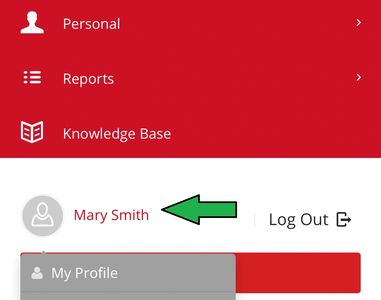
Choose QR Code from Drop Down.

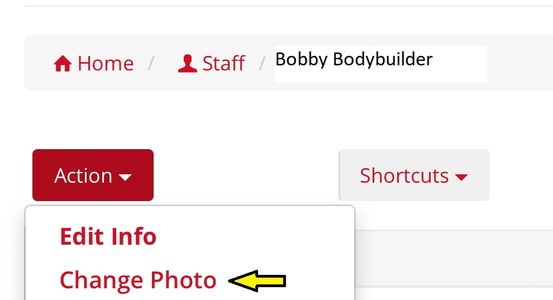
Add Your Profile Picture-Click on Profile
Click on ACTION choose Change Photo, then upload your profile picture for our records.